





Between 30 and 90 seconds. That is the honest answer, and everything below is why.
The hardware will let you go far longer. A 1 GB module holds around 20 minutes of video at the quality these screens display, and a full charge gives roughly 4 hours of total playback. Memory is not your constraint and neither is battery.
Attention is. And attention behaves differently depending on where the box gets opened.
Key takeaways
- Aim for 30 to 90 seconds. Sixty seconds is a comfortable default, trade show handouts sit nearer 30, and influencer sends at 20 to 40.
- The first five seconds decide whether the rest gets watched. Open on the reason to keep watching, not on your logo.
- The video has to work with the sound off. Put the key message on screen as text and caption anything spoken.
- End on one next step rather than your logo. The logo is already printed on the box in their hands.
- Hardware is not the limit. A 1 GB module holds around 20 minutes and a full charge gives roughly 4 hours of playback.
The number by situation
Where the package is opened matters more than what is in the video.
| Where it is opened | Realistic attention | Target length |
|---|---|---|
| At a desk, alone, deliberately | High | 60 to 90 seconds |
| At a desk, between other tasks | Medium | 45 to 60 seconds |
| At a trade show, standing, in noise | Low | 20 to 30 seconds |
| On camera, being filmed for content | Very short | 15 to 30 seconds |
The last row is the one people get wrong. An influencer filming an unboxing will not sit through 90 seconds of your video, and neither will their audience. The clip that gets posted is the lid lifting and the screen coming to life. Everything after the first ten seconds is for the influencer, not for the feed.
Where the 30 to 90 second number comes from
I did not invent this range. It comes from three things that all point the same way.
The first is drop off. Any video that people can walk away from loses viewers continuously from the first frame. The curve is steepest at the start. Most of the loss on a short film happens in the first ten seconds, and the rest of the decline is gradual.
A packaging video is unusual because the viewer did not choose to press play. Something started playing at them. That makes the early drop off sharper than it would be on a video somebody clicked.
The second is the situation. The box is open, the product is right there, and the recipient wants to pick it up. Your video is competing with the thing your video is about. That is a competition you will lose after about ninety seconds.
The third is what people actually do. In practice a recipient watches until they feel they have got the point, then reaches for the product. If the point arrives at forty seconds and the video runs three minutes, they stop at forty five and the remaining two minutes were never seen by anyone.
So the ceiling is not attention span in the abstract. It is the moment your message completes. Get to that moment sooner and length stops being a problem.
The first five seconds decide the rest
Whatever your total length, the opening five seconds carry it.
The recipient has just lifted a lid and something started playing. They do not yet know whether this is worth watching. In that window they decide, and almost nobody reverses that decision.
So the first five seconds should not contain your logo animation. It should contain the reason to keep watching.
What works in the opening: the product in use, a face speaking directly, a number that surprises, or the single sentence that explains what this is.
What loses them: a logo sting, an establishing shot of a building, a slow fade from black, or music with nothing happening.
There is a simple test. Play your first five seconds with the rest cut off and ask somebody who has never seen it what they think this is about. If they cannot say, the opening is decoration.
It has to work with the sound off
This is the constraint most people discover too late.
A large share of these packages are opened in an office, in a meeting room, or in an open-plan space where nobody is going to turn the volume up. Some are opened on camera with the audio muted so a voiceover can be added later.
If your message only lands with audio, it does not land.
- Put the key message on screen as text, not only in the voiceover
- Use captions for anything spoken
- Make sure the product is visible, not just described
- Assume the music is doing nothing
This is not an argument against audio. Sound makes a good video better. It is an argument against audio being the only carrier of anything the viewer needs.
The anatomy of a 60 second packaging video
Here is a structure that works across almost every category. Timings are approximate and the proportions matter more than the exact seconds.
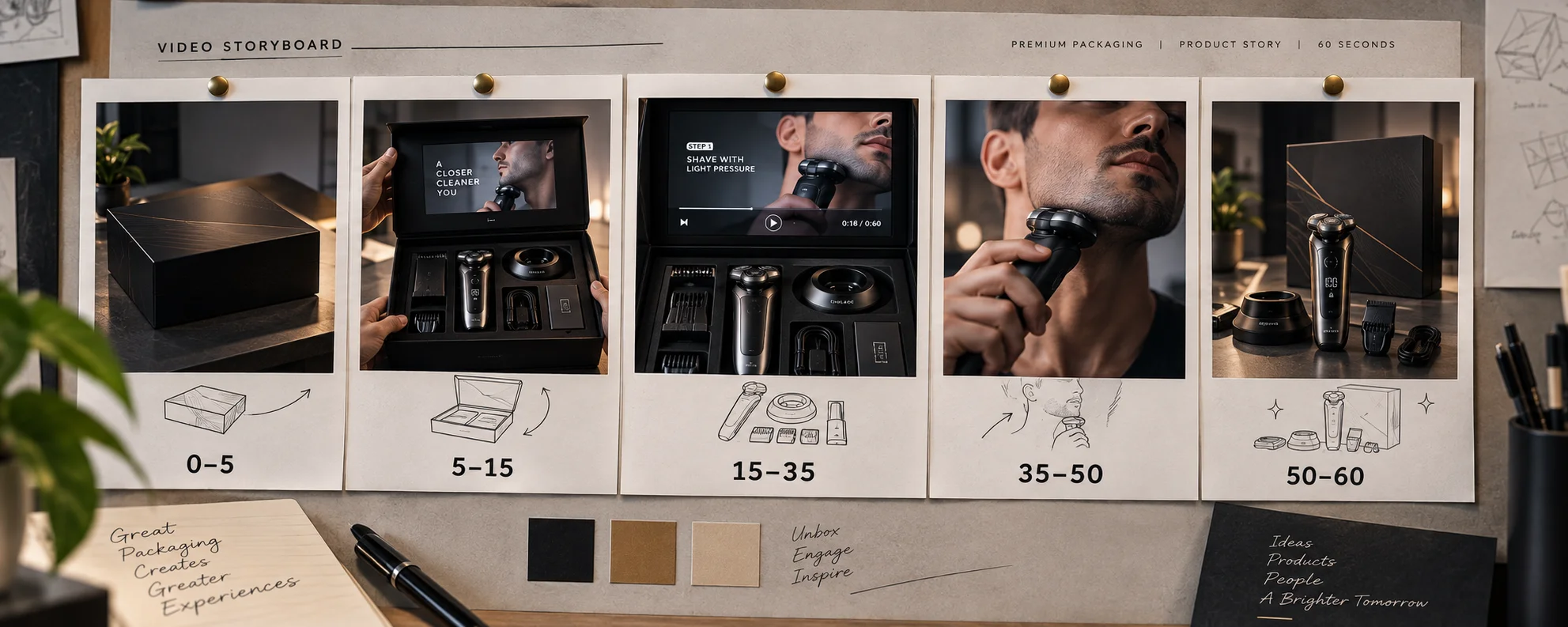
| Time | What happens | Purpose |
|---|---|---|
| 0 to 5 sec | The hook. Product in use, a face, or a claim | Buy the next ten seconds |
| 5 to 15 sec | What this is, in one sentence | Orientation |
| 15 to 35 sec | The demonstration. Show the thing working | The actual content |
| 35 to 50 sec | Why it matters. The difference it makes | The argument |
| 50 to 60 sec | One instruction. What to do next | The ask |
The hook is not your logo. Your logo is already on the box in their hands. Spending five seconds telling somebody your name when your name is printed six inches from their thumb is the most common waste in this format.
The demonstration is the longest block for a reason. It is the part a printed box cannot do. If your video has no demonstration in it, ask yourself whether it needed to be a video.
The argument section is where most videos get vague. Specific beats broad. A number, a comparison, or a named use case lands. A sentence about passion does not.
The ask should be one thing. Scan this code. Email this person. Try it now. A video that ends with four options ends with none.
Three scripts you can adapt
Same structure, three different jobs. Each of these runs about 60 seconds when read at a natural pace.
Script one: a press kit for a product launch
0 to 5. Close on the product doing the thing it does. No narration yet. One sound.
5 to 15. A founder or product lead, direct to camera. “This is [product]. It does [one specific thing] and it launches on [date].”
15 to 35. Hands demonstrating the two features that matter most. Text on screen naming each one. No voiceover needed here if the visuals carry it.
35 to 50. The context. Who it is for, what it replaces, what it costs. This is the block a journalist actually needs.
50 to 60. “Everything you need, including images and specs, is at the link on the card. My email is on there too.”
Script two: an influencer seeding box
0 to 8. Fast, bright, product first. Something visually surprising in the first two seconds.
8 to 20. One sentence on what it is, on screen as text as well as spoken.
20 to 30. The one thing that makes it different, shown rather than described.
30 to 35. A short thank you that names why they specifically were sent it.
This one is deliberately shorter. Keep it to 30 to 40 seconds total. The clip that gets posted is the lid opening and the screen lighting up, and everything after the first ten seconds is for the creator rather than for their feed.
Script three: a sales or investor presentation box
0 to 6. A number on screen. The single most compelling figure you have.
6 to 20. What the number means, spoken by a real person from the company.
20 to 45. The product or the case, demonstrated. Charts only if they are simple enough to read on a small panel.
45 to 70. What you are asking for and what happens next.
70 to 80. Contact, name, and a direct line.
This is the one case where going past 60 seconds is usually correct. The viewer is a professional evaluating a proposition and they are not in a hurry.
Not sure how long your video should be?
Send us the film you have and tell us who is opening the box. We will suggest the right length, screen size and file setup before production.
What actually fills 60 seconds
When people hear 60 seconds they assume it is not enough. It is more than it sounds.
Sixty seconds of a well-cut video holds roughly 150 spoken words, which is a full paragraph of argument. It holds three product shots with time to look at each. It holds a founder saying one clear thing and meaning it.
Here is a structure that fits comfortably in a minute:
| Seconds | What happens |
|---|---|
| 0 to 5 | The hook. What this is, or the product doing the thing it does |
| 5 to 20 | The problem, stated once, specifically |
| 20 to 45 | The product, shown rather than described |
| 45 to 55 | The one thing you want remembered |
| 55 to 60 | What to do next, on screen as text |
The last five seconds are the most wasted in this format. Most videos end on a logo. The recipient is holding a box with your logo printed on it, so the logo is already in their hands. Use that time for the next step instead.
Length by what you want to happen
Work backwards from the outcome rather than forwards from the content.
| What you want | Length | Why |
|---|---|---|
| A person to remember your name | 15 to 25 sec | One idea, repeated visually |
| A journalist to have the facts | 45 to 60 sec | Enough for the essentials, no more |
| A creator to film the opening | 20 to 30 sec | The screen lighting up is the shot |
| A buyer to understand the product | 60 to 90 sec | Demonstration takes time |
| An investor to take a meeting | 75 to 120 sec | The only case for going long |
| A recipient to feel something | 30 to 45 sec | Emotion does not need length |
| A user to learn how to set it up | 90 to 180 sec | Instructional content is different |
That last row is worth expanding. Instructional video is genuinely different from promotional video, because the viewer needs it and will stay for as long as it takes. If your box contains a complex product and the video is the setup guide, length rules do not apply the same way.
Even then, chapter it. Several short segments with buttons to select between them works better than one long file, and most modules support that configuration if you ask for it at the specification stage.
How to cut three minutes down to sixty seconds
Most brands arrive with a film that already exists. Here is the process that works.
Step one. Write down the single sentence you need them to leave with. Not three sentences. One. Everything that does not serve that sentence is now a candidate for removal.
Step two. Delete the opening. Almost every corporate film starts with thirty seconds of establishing shots, logo animation, and music building. Cut all of it. Start on the strongest frame in the entire film.
Step three. Delete the ending. The last twenty seconds are usually a slow fade, a logo, and a website address. The box already has your logo and your website on it.
Step four. Find the demonstration and keep it whole. Whatever section shows the product working is the core. Protect it.
Step five. Cut every transition in half. Cross fades, holds on static frames, and pauses between lines. This alone recovers fifteen to twenty seconds from most films without removing any content.
Step six. Replace narration with text where the text is shorter. Speaking takes longer than reading. A line that takes six seconds to say takes two seconds to read.
Step seven. Watch it with the sound off. If it still makes sense, you are done. If it does not, you have more work than trimming.
That process reliably gets a three minute film to about seventy seconds. The last ten seconds usually come out of the argument section, which is almost always longer than it needs to be.
The technical limits, which are not the real limits
For completeness, here is what the hardware actually allows, because people ask.
| Screen | Approximate minutes per GB | Common memory |
|---|---|---|
| 2.4 inch | 28 to 34 min | 128 MB to 1 GB |
| 4.3 inch | 22 to 26 min | 512 MB to 2 GB |
| 5 inch | 18 to 22 min | 1 to 4 GB |
| 7 inch | 14 to 18 min | 1 to 8 GB |
| 10.1 inch | 12 to 16 min | 2 to 8 GB |
Even the tightest combination gives you around twelve minutes. Battery gives you two and a half to six hours of total playback per charge depending on screen size.
So the hardware allows something like a hundred and fifty openings of a ninety second video before anybody needs to plug anything in. Memory and battery are not your constraint and they never will be for a normal send.
The one exception is a box that plays continuously, such as a retail display. There, battery is the whole conversation and you should plan for charging.
When longer is right
There are cases where 90 seconds is not enough, and they share one feature. The recipient has a reason to want the detail.
An investor package. Somebody evaluating a business will watch three minutes if the content is substantive. They are being asked to make a decision and they want the information.
A technical product demonstration. If the product does something that has to be seen to be understood, the demonstration takes as long as it takes.
A recruitment or culture piece. A candidate deciding whether to join will watch longer than a buyer deciding whether to reply.
Even in these cases, the video should be structured so it can be abandoned early without losing the point. Put the conclusion first and the supporting detail after it. That way a viewer who stops at 40 seconds still received the message.
Test it before you commit
You are about to load one file onto a hundred or more modules. Twenty minutes of testing is worth it.
The five second test. Play the first five seconds to somebody who has never seen it, then stop. Ask them what this is about. If they cannot say, your opening is decoration and the rest of the video will not be watched.
The silent test. Watch the whole thing with the sound off. Everything essential should still land. If it does not, add text.
The small screen test. Export a few still frames, scale them to the panel’s native resolution, then look at them at that size. Text that is soft at that point will be soft on the box.
The stranger test. Show it to somebody outside your company and time how long before they look away. That moment is your real length, not the runtime.
The desk test. If you have a working sample, put it on a desk and open it the way a recipient would. Watching a file on a laptop and watching it on a small panel at arm’s length are different experiences.
Ask for a working sample with your video loaded before production. It costs a few hundred dollars and ten to twelve business days, and it is the only way to see what you are actually buying.
Category patterns I see repeatedly
Not rules, but consistent tendencies.
Beauty and personal care. Videos run too long and too polished. The demonstration is what people want and it usually starts at forty seconds. Move it to eight.
Consumer electronics. Videos run at about the right length and spend too much of it on specifications. Show it working instead.
Food and drink. Naturally short and usually well judged. The risk is that nothing is being demonstrated at all, so it becomes a mood piece with no message.
B2B and industrial. Consistently far too long. A four minute capability film in a box is not watched. Cut to ninety seconds and put the rest behind a QR code.
Luxury and fashion. Beautiful and often silent on message. If the video does not say what the thing is, the box has to.
Nonprofit and cause. These earn more length than anything else, because the viewer is being invited to care rather than to buy. Ninety seconds is defensible here.
Two mistakes worth naming
Reusing your existing commercial. A broadcast spot was made for a different context, a different screen and a different moment. It usually opens slowly because it was competing for attention in a break. In a box, you already have the attention. Cut the windup.
Filling the memory because it is there. An 8 GB module can hold a long film. That is a specification, not an instruction. Nobody has ever complained that a packaging video was too short.
What to send the factory, and why the file matters
Length is decided in the edit. Quality is decided in the export, and a badly exported file makes a good video look cheap on a small panel.
Send the highest quality master you have. MP4, H.264, 1920 x 1080 for any panel from 4.3 inch upward. The factory scales it to the panel. If you send a file you have already compressed for social, you are compressing twice and it shows.
Frame rate at 25 or 30. Higher frame rates buy nothing on these panels and cost bitrate.
Avoid heavy grain and fine texture in the background. Compression at these bitrates handles noise badly. A clean background at a modest bitrate looks better than a grainy one at a high bitrate.
Check the first frame. Some modules display frame one as a still while the file loads. If your first frame is black, the box appears to do nothing for a moment, and that moment is the one you paid for.
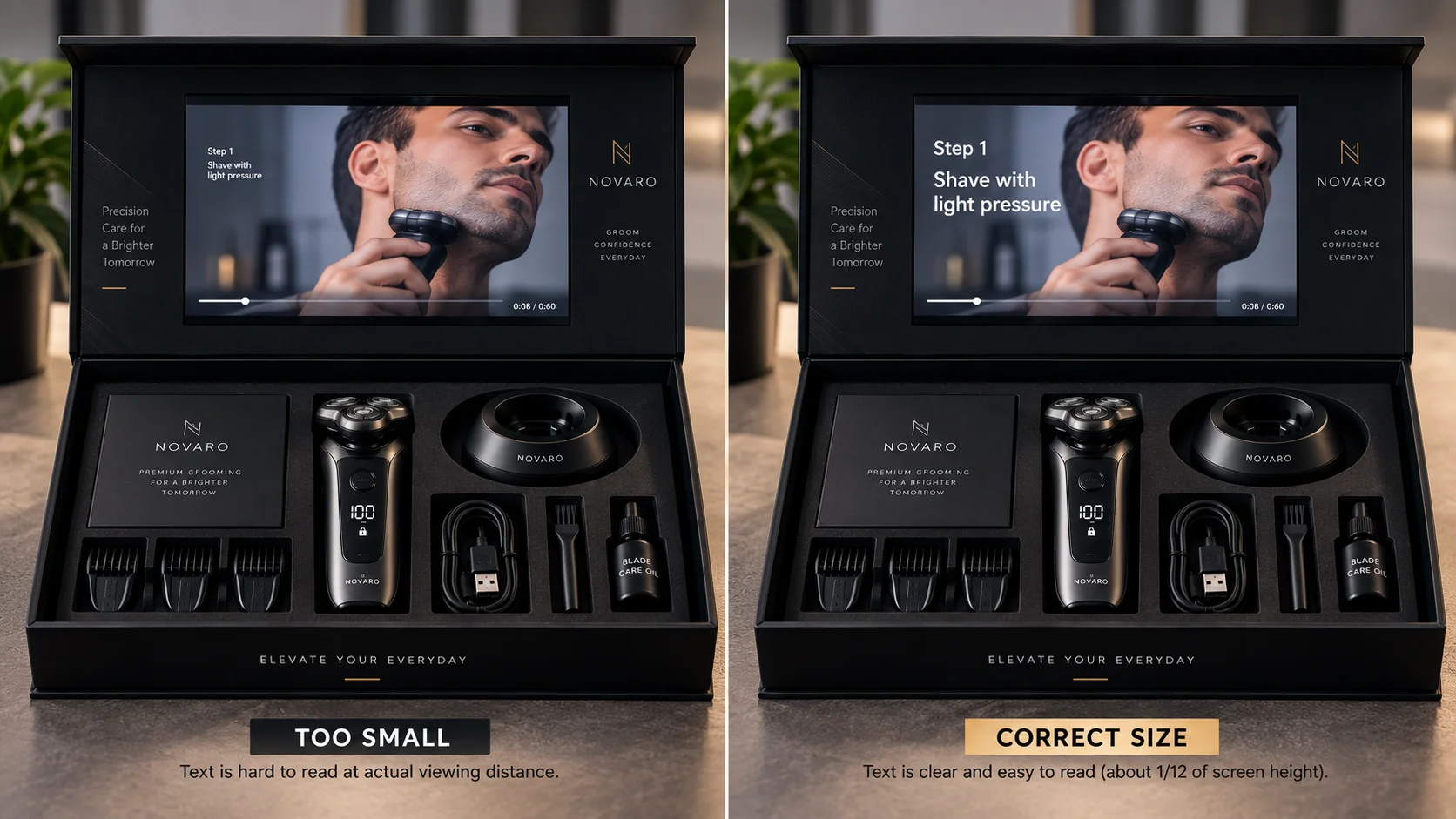
Size text generously. A useful rule is that any text on screen should be at least one twelfth of the screen height. On a 4.3 inch panel that is much larger than a designer’s instinct.
Mix the audio for a small speaker. The speaker in a video box is small and sits behind board. Heavy bass disappears and quiet dialogue vanishes. Mix voice forward and keep the music low.
Check the aspect ratio against the panel. Four of the five common sizes are 16:9. The 2.4 inch panel is usually 4:3, so a 16:9 file gets black bars on an already small screen. If you are using 2.4 inch, frame for 4:3 from the start.
More detail on panel sizes and resolutions is in video box screen sizes.
What to do with the material you cut
You just removed two minutes of video that somebody paid to produce. It does not have to be wasted.
Put the long version behind a QR code printed on a card inside the box. Anybody who wants more can have more, and the people who do not are not made to sit through it.
Use the cut sections as social content. A demonstration section, a founder segment, and a product close up are three separate posts.
Load multiple files if the module supports it. Ask for a multi file configuration with buttons at the specification stage. Then a short film plays on opening and a longer one is available for anybody who presses a button.
Keep it for the next campaign. The module reloads over USB, so the same boxes can carry a different video later. That is covered in can you reuse a video box.
The point is that a short video in the box does not mean a short story. It means the short version is the one that arrives uninvited and the long version is the one somebody chooses.
The one question that settles it
If you are still unsure, answer this.
What is the single thing this person needs to know that the box cannot tell them?
The box already carries your name, your colors, your product name, and probably a line of copy. All of that is handled. The video does not need to repeat any of it.
What the box cannot do is show something happening. It cannot show a person speaking. It cannot show a product working, a before and after, or a hand using the thing.
So the video should be exactly as long as it takes to show that one thing, plus five seconds to earn attention at the start and five seconds to say what to do at the end.
For most products that is between thirty and ninety seconds. If your answer genuinely takes longer, take the longer time. If it takes twenty seconds, take twenty. A twenty second video that lands beats a ninety second one that gets abandoned at thirty.
Related reading
Video box screen sizes covers panel resolutions and the text sizing rule in more detail.
Video brochure vs video box vs video mailer explains why the right length changes with the format.
Can you reuse a video box covers reloading a new file onto the same boxes for your next campaign.
A word on music
Music is the last decision people make and it changes the perceived length more than the runtime does.
A track that builds slowly makes a 60 second video feel like two minutes. A track that starts already moving makes the same video feel short.
So pick music that starts where the video starts, and cut it to land on your final frame rather than fading it out. A hard end reads as deliberate. A fade reads as running out.
And keep it under the voice. The speaker in a video box is small and sits behind board, so music that sounds balanced on headphones will bury dialogue on the panel.
Frequently asked questions
The short version
Sixty seconds. Front-load the point. Make it readable with the sound off. End on the next step rather than your logo.
If you are unsure whether your cut is working, watch it once on a phone at arm’s length with the volume down. That is closer to the real viewing conditions than a laptop with headphones, and it will tell you within ten seconds whether the opening is doing its job.
Ready to put your video in a box?
At The Customized Boxes we build video boxes around your product and load your video before dispatch. Send us the file you have and we will match it to the screen.
